HostDog Security Alert: Email Scams Making the Rounds (October 2026)
Hey folks,
Jason Russo here. I wanted to shoot you a quick heads-up about some email scams that have been hitting our clients' inboxes lately. These are getting slicker by the day, and even the savviest among us can get tripped up if we're not paying attention. Let's break down what to watch for.
1. The Fake Domain Renewal Notice
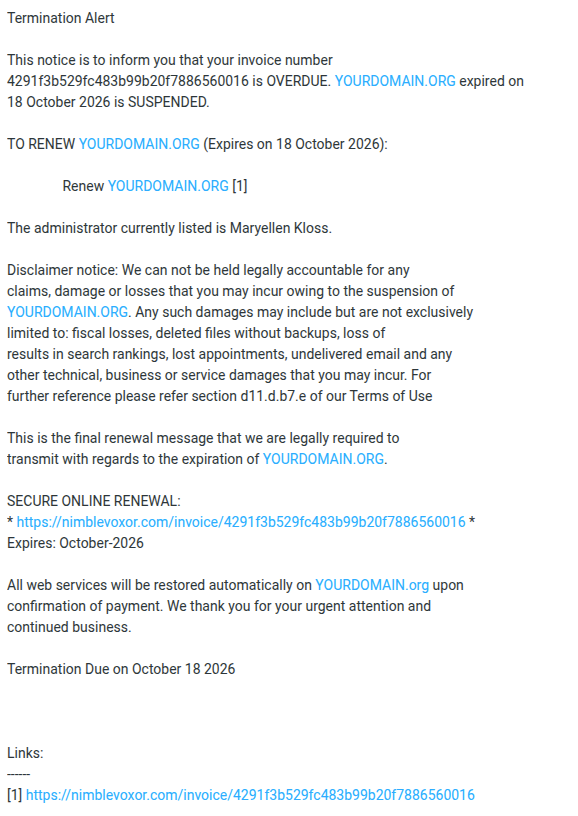
What it looks like:You get an urgent email with a subject like "Termination Alert" claiming your domain name is expired or suspended. It includes an invoice number, your actual domain name, and even the name of the administrator on the account. The email threatens loss of search rankings, deleted files, undelivered email — basically every disaster short of a meteor strike.
How to spot it:- Check the sender and links. The renewal link points to a random domain instead of your actual registrar. Your real registrar is whoever you registered the domain with — GoDaddy, Namecheap, etc. If you don't recognize the company, it's not legit.
- Scare tactics are a red flag. Legitimate registrars send polite renewal reminders, not legal-sounding threats about “section d11.d.b7.e of our Terms of Use.” That's made-up nonsense.
- Verify independently. If you're worried your domain might actually be expiring, log into your registrar's website directly (type the URL yourself — don't click the email link) and check your account.
Your credit card number. They'll charge you an inflated “renewal” fee for a service they don't provide, and now they have your payment info too.
2. The Bank Fraud Alert (American Express, Chase, etc.)
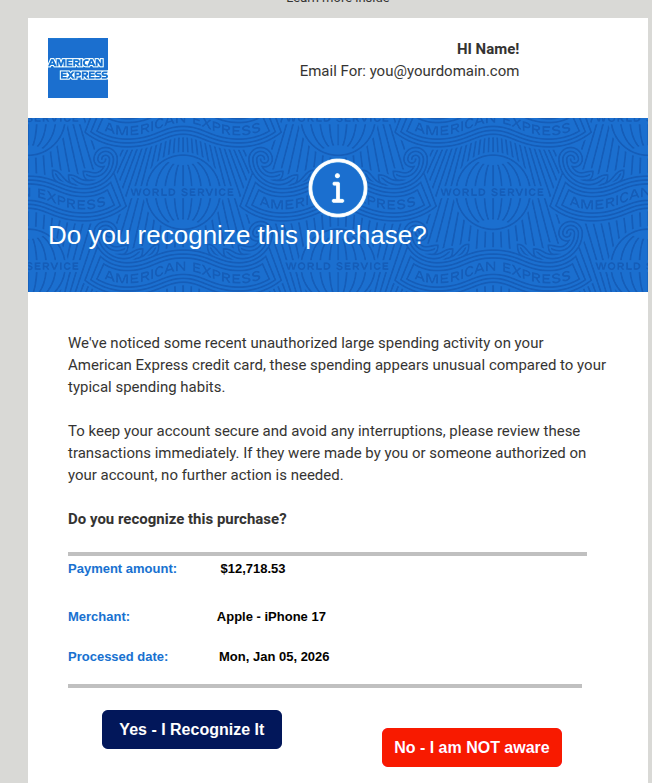
What it looks like:A very professional-looking email styled exactly like an American Express notification. It says they've detected “unauthorized large spending activity” — in this case, a $12,718.53 purchase for an “Apple - iPhone 17.” There are two big buttons: “Yes - I Recognize It” and “No - I am NOT aware.” Both buttons go to the same scam link.
How to spot it:- Both buttons go to the same place. That's a dead giveaway. A real fraud alert would have different actions for “yes” and “no.”
- Check the link destination. Hover over the buttons (don't click!). In this example, both pointed to a shortened “t.co” link — not americanexpress.com. Your bank will always link to their own official domain.
- Look at who it's addressed to. This one was addressed to “HI church” at a church email address. American Express doesn't send fraud alerts to generic organizational email accounts.
- The amount is designed to panic you. Scammers pick large, alarming amounts to make you click without thinking.
They're after your American Express login credentials. The link takes you to a fake login page that looks just like the real thing. Once you enter your username and password, they've got the keys to your account.
What to do instead:If you're genuinely concerned about a charge, call the number on the back of your physical card or log into your account by typing the bank's URL directly into your browser.
3. The “Verify Your Email” / Webmail Scam
What it looks like:An email claiming to be a “Mailbox notification” from your email server. It says your IMAP/POP3 and SMTP settings “require verification” and asks you to click a “Verify Email” button to avoid delivery interruptions. It may use your actual email address to look legitimate.
How to spot it:- Your email provider won't ask you to “verify” like this. If there were a real issue with your email configuration, you'd see it in your email client (Outlook, Thunderbird, etc.) — not in a random incoming message.
- Check the link. These verification buttons typically point to sketchy destinations. In the examples we've seen, the links go to “ipfs.io” — a decentralized file-sharing network that scammers love because it's hard to take content down from it. Some even route through Google Ads redirects to disguise the final destination.
- Weird characters and formatting. These emails often have odd spacing, unusual characters, or slightly garbled text (like “maіntaіnance” instead of “maintenance”). That's the scammers trying to sneak past spam filters.
Your email password. Once they have it, they can read your email, send messages as you, reset passwords on your other accounts, and cause all kinds of havoc.
4. The “Your Password Is Expiring” Scam
What it looks like:A close cousin of the verification scam. This one tells you “The password to your mailbox is set to expire today” and offers a helpful button to “Keep Existing Password.” It may even claim to be generated by your own organization's mail server.
How to spot it:- Email passwords don't just “expire” on their own. Unless your organization has a specific password rotation policy (and you'd know about it), this is fiction.
- The “Keep Existing Password” trick is clever. It sounds harmless — you're not even changing anything, right? Wrong. Clicking that button takes you to a fake login page where you'll hand over your current password.
- Check who sent it. The “from” address is usually spoofed or from a completely unrelated domain.
Same as above — your email credentials.
The Golden Rules
No matter what kind of scam email you're looking at, these rules will keep you safe:
- Never click links in unexpected emails. Go to the website directly by typing the URL into your browser.
- Hover before you click. On a computer, hover your mouse over any link to see where it actually goes. If the URL doesn't match the company that supposedly sent the email, it's a scam.
- Don't let urgency override your judgment. Scammers want you to panic and act fast. Take a breath. A real company will give you reasonable time to handle any legitimate issue.
- When in doubt, call us. Seriously — that's what we're here for. If you get a weird email about your domain, your hosting, or your email account, forward it to us and we'll tell you if it's real or garbage.
- Use two-factor authentication (2FA) wherever possible. Even if someone does get your password, 2FA adds a second lock on the door.
Stay safe out there, and don't hesitate to reach out if something looks fishy.
— The HostDog Team